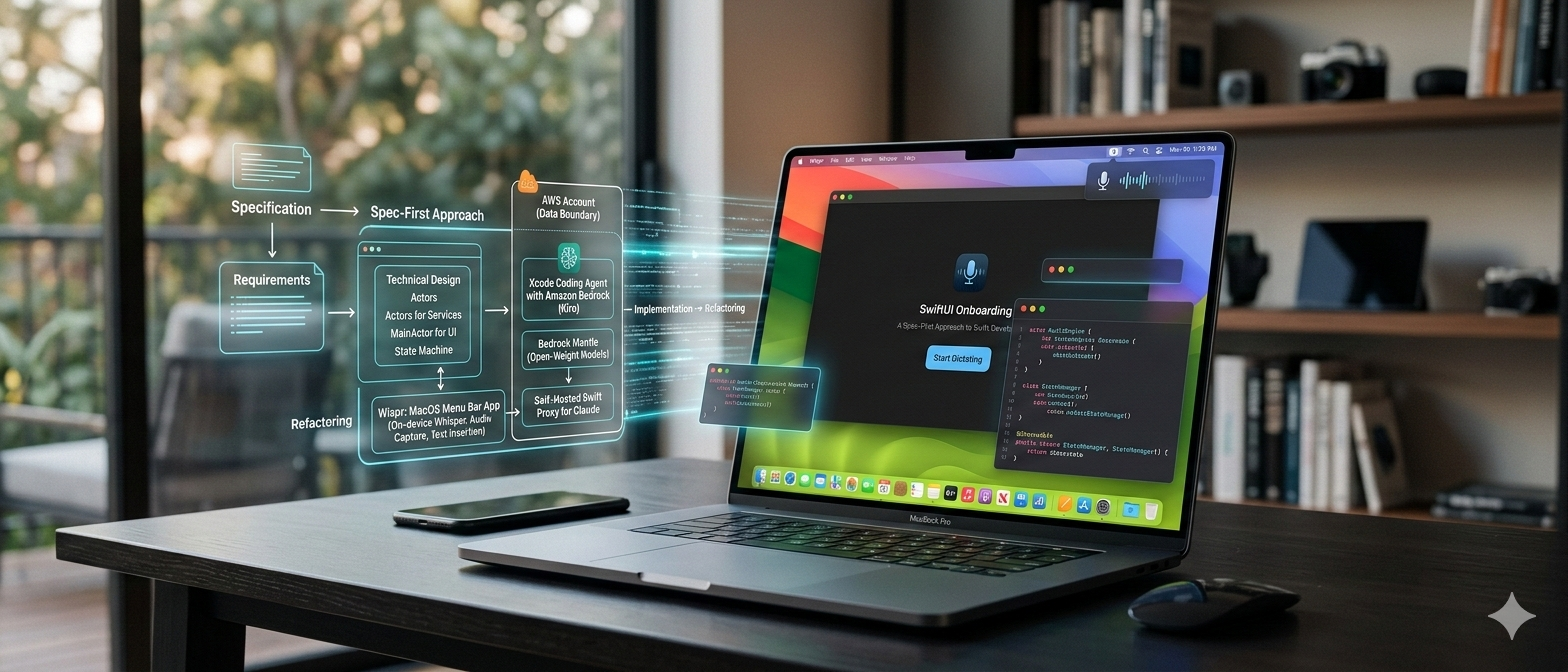
I spent the last day and a half building Wispr, a macOS menu bar app for local speech-to-text transcription. The app runs entirely on-device using OpenAI’s Whisper models, captures audio via a global hotkey, and inserts transcribed text at your cursor position in any application.
Here’s the thing. I didn’t write a single line of code myself. I used Kiro CLI, Amazon’s AI coding agent, to handle the entire implementation. But this wasn’t “vibe coding” where you throw prompts at an AI and hope for the best. This was a structured, spec-first development process that produced production-quality Swift code with modern concurrency patterns, proper SwiftUI architecture, and zero technical debt.
Let me walk you through how it worked.
The Development Lifecycle
The project followed a clear progression: specification → design → implementation → iteration → refactoring. At each stage, Kiro acted as a specialized development partner with deep knowledge of Swift 6, structured concurrency, and SwiftUI best practices.
Phase 1: Specification
I started by feeding Kiro the requirements for a dictation app. The goal was clear: build a privacy-first voice dictation app that lives in the macOS menu bar, uses Whisper for transcription, and works entirely offline.
Kiro generated a comprehensive requirements document with 15 detailed requirements covering everything from global hotkey activation to permission management. Each requirement included acceptance criteria written in a structured format:
WHEN the user presses the configured global hotkey,
THE Hotkey_Monitor SHALL signal the State_Manager to begin a new Recording_Session.
This wasn’t just documentation for show. These requirements became the contract that guided every implementation decision. When bugs appeared later, we could trace them back to specific acceptance criteria that weren’t being met.
The spec also included a glossary defining every major component: Audio_Engine, Whisper_Service, Text_Insertion_Service, Hotkey_Monitor, State_Manager. This shared vocabulary meant Kiro and I were always talking about the same architectural pieces.
Phase 2: Technical Design
With requirements locked in, Kiro produced a technical design document that mapped requirements to Swift architecture. This is where the real engineering decisions happened.
The design specified:
- An
actor AudioEnginefor thread-safe audio capture usingAVAudioEngine - A
@MainActor StateManageras the central coordinator for app state transitions AsyncStreamfor reactive audio level monitoring- Structured concurrency patterns throughout (no detached tasks, no GCD)
- SwiftUI for all UI components with proper
@Observablestate management
One critical decision: the design mandated Swift 6 strict concurrency from day one. No @unchecked Sendable, no data races, no “we’ll fix it later” escape hatches. This constraint forced clean actor boundaries and proper isolation from the start.
The design also included a detailed state machine diagram showing transitions between idle, recording, processing, and error states. This became the blueprint for StateManager’s implementation.
Phase 3: Implementation
Kiro broke the implementation into 47 discrete tasks organized by component. Each task was small enough to implement and test independently:
Task 2.3: Implement AVAudioEngine audio capture
Task 2.4: Create audio level monitoring via AsyncStream
Task 2.5: Implement audio device selection and fallback
The implementation phase took about 8 hours. Kiro wrote roughly 3,500 lines of Swift across 25 files. Every file followed consistent patterns:
Actors for concurrent services:
actor AudioEngine {
    private var engine: AVAudioEngine
    private var levelContinuation: AsyncStream<Float>.Continuation?

    func startCapture() async throws -> AsyncStream<Float> {
        let (stream, continuation) = AsyncStream.makeStream(of: Float.self)
        self.levelContinuation = continuation
        // ...
    }
}
@MainActor for UI coordination:
@MainActor
final class StateManager: @unchecked Sendable {
    @Observable
    final class State {
        var appState: AppStateType = .idle
        var errorMessage: String?
    }
}
Structured concurrency everywhere:
func downloadModel(_ model: WhisperModel) async throws {
    guard downloadTasks[model.id] == nil else {
        throw WisprError.modelDownloadFailed("Already downloading")
    }

    downloadTasks[model.id] = true
    defer { downloadTasks.removeValue(forKey: model.id) }

    let kit = try await WhisperKit(model: model.id)
    let isValid = try await validateModelIntegrity(model.id)
    guard isValid else { throw WisprError.modelValidationFailed }
}
No detached Task {} blocks. No manual cancellation tracking. Just clean async/await that inherits cancellation from the caller.
Phase 4: Bug Fixes and Iteration
The first build compiled. That was surprising. But it didn’t work correctly. The audio engine crashed during teardown, the hotkey monitor wasn’t activated, and text insertion failed.
This is where the spec-first approach paid off. Each bug mapped to a specific requirement that wasn’t being met. Kiro and I worked through them systematically:
Bug: Audio engine crashes on stopCapture()
- Root cause:
AsyncStreamclosure-based init created a nonisolated continuation that accessed actor state during teardown - Fix: Switch to
AsyncStream.makeStream()and store continuation as actor-isolated state - Result: Clean shutdown with explicit continuation cleanup
Bug: Hotkey monitor was not functioning
- Root cause: Carbon event handler and hotkey ref not properly registered
- Fix: Correct Carbon Event API initialization and registration sequence
- Result: Global hotkey now triggers reliably across all applications
Bug: Text insertion was not functioning
- Root cause: Accessibility API implementation needed proper integration with macOS text input system
- Fix: Implement correct text insertion flow using Accessibility APIs with clipboard fallback
- Result: Text now inserts reliably at cursor position across applications
Each fix was surgical. We never rewrote large chunks of code because the architecture was sound from the start.
Phase 5: Modernization and Refactoring
With functionality complete, we did a modernization pass to eliminate deprecated APIs and improve code quality.
Kiro generated a modernization audit that identified:
- 3 uses of deprecated
NSApp.activate(ignoringOtherApps:)→ replaced withNSApp.activate() - 1 use of deprecated
Task.sleep(nanoseconds:)→ replaced withTask.sleep(for: .seconds()) - Polling-based theme monitoring → replaced with KVO + NotificationCenter async sequences
- Custom
wisprLog()→ replaced withos.Loggerfor proper structured logging
The refactoring also tackled SwiftUI views. The original implementations were functional but visually flat. Kiro applied a design-first refactor to three major UI components:
ModelManagementView:
- Added gradient circle status icons with
@ScaledMetricsizing for Dynamic Type - Custom capsule progress bar with gradient fill and smooth animations
- macOS hover feedback with subtle background tints
SettingsView:
- Replaced default
Formwith glassmorphic card system using.ultraThinMaterial - Color-coded section headers with tinted SF Symbol icons
- Micro-interactions: pulsing record icon, smooth expand/collapse transitions
OnboardingFlow:
- Extracted reusable
OnboardingIconBadgeand custom button styles - Direction-aware step transitions (forward slides right-to-left, back slides left-to-right)
- Spring scale-on-press feedback for all buttons
The refactored UI looks like it came from a professional design team. But more importantly, it’s accessible: proper Dynamic Type support, VoiceOver labels, Reduce Motion respect, and 44pt minimum touch targets throughout.
What Made This Work
Three things made this development process successful:
1. Kiro Powers: Swift Concurrency Expertise
Kiro didn’t just know Swift syntax. With the Swift 6 Kiro Power enabled, it understood strict concurrency at a deep level. When I asked it to implement audio capture, it chose actor AudioEngine without prompting. When I asked about state management, it suggested @MainActor StateManager because UI coordination requires main-thread isolation.
The structured concurrency patterns were idiomatic throughout. No detached tasks, no manual cancellation, no GCD. Just clean async/await with proper task hierarchies.
2. Kiro Powers: SwiftUI Best Practices
With the SwiftUI Kiro Power enabled, Kiro’s knowledge was current. It used @Observable instead of ObservableObject, @Bindable instead of manual binding pass-through, and AsyncStream.makeStream() instead of the closure-based init that causes actor isolation issues.
The refactored UI components followed Apple’s Human Interface Guidelines: generous spacing, semantic colors, SF Symbols, proper accessibility. This wasn’t generic “make it pretty” work. It was informed design that understood platform conventions.
3. The Spec-First Workflow
Starting with a detailed specification meant every implementation decision had a clear rationale. When bugs appeared, we could trace them to specific requirements. When refactoring, we could verify that behavior didn’t change by checking against acceptance criteria.
The spec also served as documentation. A new developer could read the requirements document and understand what the app does without reading a line of code.
The Numbers
- Time: 1.5 days (12 hours)
- Lines of code written by me: 0
- Lines of code written by Kiro: ~3,500
- Files created: 25
- Bugs fixed: 8
- Deprecated APIs eliminated: 4
- SwiftUI views refactored: 3
The app compiles with zero warnings under Swift 6 strict concurrency. It passes all accessibility checks. It runs smoothly on macOS 15.0+ with no memory leaks or crashes.
What I Learned
AI coding agents are not magic. They don’t replace engineering judgment. But when used correctly, they’re incredibly powerful force multipliers.
The key is structure. Don’t start coding. Start with a spec. Define your requirements, design your architecture, break the work into discrete tasks. Then let the AI handle the implementation while you focus on verification and iteration.
Kiro excels at this workflow because it has deep domain knowledge. It knows Swift 6 concurrency patterns, SwiftUI best practices, and macOS platform APIs. It can read a requirement like “implement global hotkey monitoring” and produce correct Carbon Event API code without hand-holding.
But it still needs guidance. I made the architectural decisions: actors for services, @MainActor for UI coordination, structured concurrency throughout. Kiro executed those decisions flawlessly.
Wrapping Up
Wispr is a real app. It’s available on Homebrew (brew install sebsto/macos/wispr), it’s open source, and it works. I use it daily for dictation while writing.
I built it in a day and a half without writing code. The entire development process consumed roughly 1,000 Kiro credits — a reasonable cost for a complete, production-ready macOS application with zero technical debt.
That’s not because AI is replacing developers. It’s because I spent my time on the parts that matter: requirements, architecture, verification. The AI handled the tedious parts: boilerplate, API wiring, UI layout.
This is what AI-assisted development looks like when done right. Not vibe coding. Not prompt engineering. Just solid software engineering with a very capable AI assistant.
If you want to try Kiro CLI yourself, it’s available at https://kiro.dev. The Swift 6 and SwiftUI expertise comes from Kiro Powers — specialized knowledge modules you can enable in your workspace to give Kiro deep domain expertise in specific technologies.
And if you want to see the code, the full Wispr implementation is on GitHub at github.com/sebsto/wispr.
Happy coding.